Cart
0
Complete Your Setup




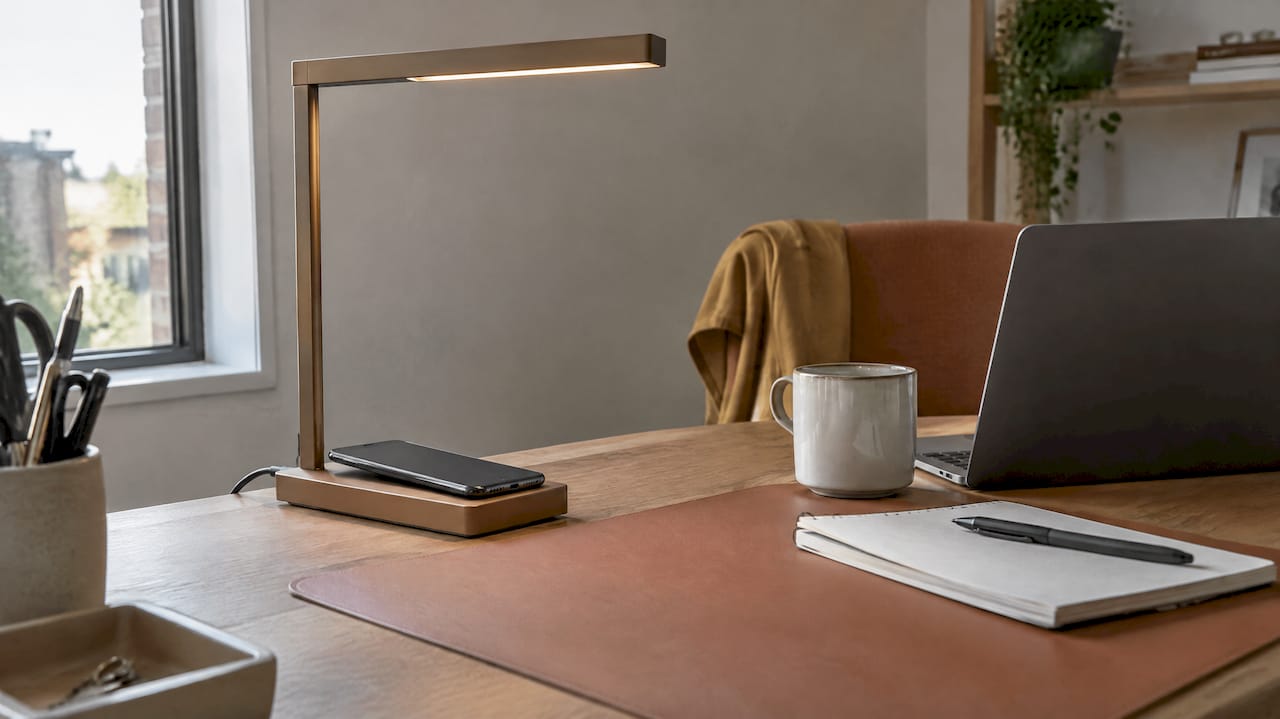
For most people, a wireless charging lamp is worth it as a nightstand or desk upgrade. It will not replace a fast wired charger. If you want one less cable and one less device on your table, and you charge your phone mostly to top it up, it’s a smart buy. If you need 0 to 100% in a hurry, keep a wired charger handy. Here is how to tell which group you’re in, and what to check before you spend money.
It’s a lamp with a charging pad built into the base, or sometimes into the arm or the top. You set your phone on the pad. The phone charges. There’s no cable to plug into the phone.
The word “wireless” is a little generous. The lamp itself still needs a power cord to the wall. You remove the cable at the phone end, not at the outlet. That is the whole trade: one cord to the wall instead of a lamp cord plus a charger cord plus a charger brick.
Most lamps also add extras:
The lighting features are often what you use most. Engineering.com’s overview of lamps with built-in wireless chargers looks at the technology behind these combined designs, including light quality and energy efficiency.
This is the real win. One object does two jobs. You stop moving things around at night to find the charger. You stop fishing for a cable in the dark. Reviewers who test chargers at scale make the same point: once you stop fumbling with cables, it’s hard to go back.
Wireless charging works best as a top-up. Put your phone down when you sit at your desk. Pick it up when you leave. The battery stays in a healthy middle range all day without you thinking about it. That is how Apple’s own guidance on MagSafe charging positions it: convenient and safe, not a race.
Plugging a cable in and out several times a day wears the port. A pad avoids that. This is a practical benefit, not a headline one, but it adds up over a phone’s life.
For a bedside lamp, speed barely matters. Your phone has eight hours. A lower-wattage pad is enough, and the lamp doubles as a soft night-light.
Wired charging is faster. In comparative testing cited by Wired, wired charging can be 30 to 50% faster. Original Qi pads are usually limited to 5-15W, while Qi2 certified devices support up to 25W. Many lamps sit at the lower end of that range, often at around 10W.

Wireless charging loses more energy than a cable. Roughly 75-80% efficiency with Qi2 and 60-75% for legacy Qi, according to the Wired testing roundup. The lost energy turns into heat.
Heat matters. Modern phones slow or pause charging when they get too warm to protect the battery. If the base feels uncomfortably hot, that’s a sign of a poor fit, a thick case or a weak design. Move to a better-aligned charger or a cable.
The coil in a pad is small. If your phone isn’t centered, it may not charge at all, or it may start and stop. The Wireless Power Consortium explains that Qi2 magnets fix this by forcing alignment. On a flat, non-magnetic lamp pad you have to line it up yourself.
A review of the category written by an independent tester argues that many charging lamps don’t live up to their promise. Read that as a caution, not a verdict. The gap is usually between certified, well-built lamps and cheap uncertified ones.
Before you buy, run through this list.
| You are… | Worth it? | Why |
|---|---|---|
| A desk worker who sets the phone down all day | Yes | Constant top-ups, tidy desk |
| Someone who wants a bedside lamp and night charger | Yes | Speed is irrelevant overnight |
| A renter with limited outlets | Yes | One plug instead of two |
| A heavy user who needs 0 to 100% quickly | Not as your main charger | Wired is faster and more efficient |
| Someone with a thick or metal-backed case | Maybe | Test fit first |
| Someone who owns a lamp you love | Maybe | A separate compact charger may suit you better |
The last row is worth being honest about. If you love your current lamp, a small, certified charging stand next to it may give you more flexibility. A charging lamp makes the most sense when you’re buying a lamp anyway.
Experts treat wireless as a convenience, not a replacement. For busy professionals who need a full charge fast, wired remains the better choice. Wireless keeps the phone ready through the day.
So the answer isn’t one or the other. Use the lamp for the daily routine. Keep a cable in your bag for the mornings when the battery is at 9% and you leave in 20 minutes.

We sell smart home gadgets that save time and cut effort, and we take a simple position on charging lamps: they earn their place when they do one job well and don’t create new problems.
That means three things to us. First, certification should be non-negotiable. A lamp that charges your phone is handling a battery you depend on every day. Second, setup should be simple. You place the phone, it charges, and you don’t think about it. Third, the lamp has to be a good lamp. If the light is harsh or the stand wobbles, the charging feature won’t save it.
We also think expectations should be realistic. A charging lamp is a top-up tool. It’s great for a nightstand and a desk. It isn’t a rapid charger, and no honest seller should promise that.
If you want the details on standards before you buy, we wrote a guide on Qi2, 15-25W output and compatibility. Smart Products. Zero Hassle.
— Tony
If you’ve decided a charging lamp suits your routine, we carry designs that pair lighting with phone charging:
You can browse the full range in Smart Home Tech. Check each product page for the specs that matter to you, including charging output and compatibility, before you order. Shop Smarter, Live Better.
A few small habits make a big difference.
If you’re also tidying the rest of your cable clutter, our guides on smart plug uses for homeowners and setting smart plug schedules show how to automate the lamp’s power too, for example turning a desk lamp off at a set time.
Some listings should make you pause:
Uncertified chargers are often cheaper, but they lack the independent testing and are more prone to inconsistent performance or failure. With a device you leave on a nightstand for hours, that trade isn’t worth it.
Most modern phones support Qi charging, but not all. Check your phone’s specs before buying. For magnetic Qi2 charging, your phone needs to support it, and some phones need a magnetic case. The lamp’s listing should name compatible devices.
Charging itself doesn’t harm a battery, but heat does. Wireless charging creates more heat than wired, so poor alignment, thick cases and uncertified pads can raise temperatures. Phones limit charging when they get hot. A certified, well-aligned charger keeps this to a minimum.
It depends on the job. Wireless is better for daily convenience and top-ups at a desk or bedside. A cable is better when you need a quick, full charge. Wired charging is more efficient and can be 30-50% faster. Many people use both.
The most common cause is poor alignment. The coil in the pad is small, so a phone that is off-center may not charge or may start and stop. Also check for a thick case, metal objects between the phone and pad, and a weak power adapter. Magnets in Qi2 chargers solve the alignment problem.
Start with Qi or Qi2 certification and foreign object detection. Then check the wattage, the magnetic alignment if your phone supports it, the built-in power supply and the quality of the light. Finally, make sure it fits your case and your desk or nightstand.