Cart
0
Complete Your Setup





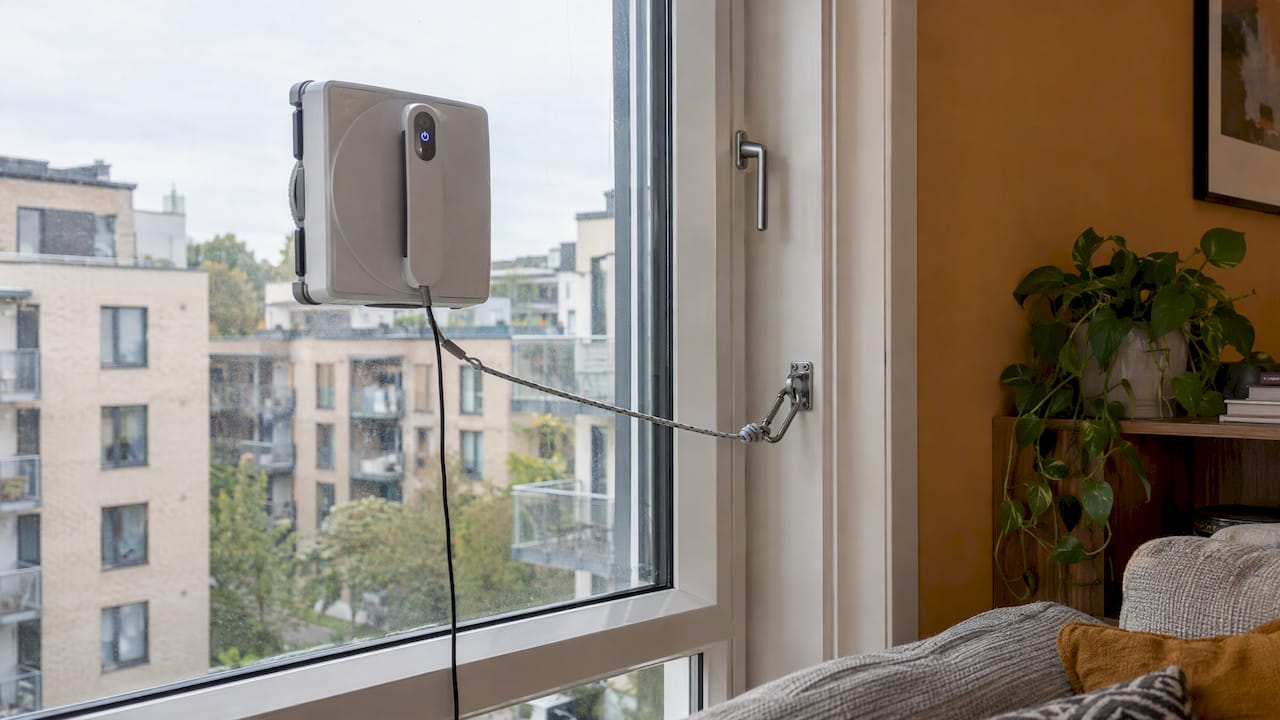
A window cleaning robot is safe to use at home when you treat it as a tool that needs a little supervision. Clip the safety rope every time. Make sure the glass is smooth, clean and intact. Stay nearby while it works, especially above a patio, a walkway or a driveway. Do those three things and you remove most of the real risk.
This guide explains how these robots hold onto glass, what the safety rope is for, which windows suit them, and a short checklist you can run in under a minute. Smart Products. Zero Hassle.
A window robot does not grip the glass the way a magnet does. It uses suction. A fan inside the body pulls air out from under the device, and the lower pressure underneath holds it against the pane. A soft seal around the base helps keep that pressure steady.
That is why surface matters so much. Suction needs three things to work: a tight seal, a fan that keeps running, and a smooth, non-porous surface. Glass gives you the third one. Cracks, textured finishes or a layer of grease can break the seal.
The fan needs power. One long-standing review in The New York Times describes a robot that has to be plugged into an outlet that feeds a powerful vacuum motor to stay stuck to the glass. Many current models also include a built-in battery that is meant as a short-term backup, not as a way to finish the job. Check how yours is designed in the manual.
So the safety picture comes down to a simple chain. Power runs the fan. The fan makes suction. Suction holds the robot. If any link breaks, the tether is what stands between the robot and the ground.

The safety rope, or tether, is a short line that runs from the robot to a fixed point inside your home. It is the last line of defense if suction fails. The same New York Times review notes that the tether helps keep the robot from falling onto pedestrians if it loses power.
This is not a formality. TechRadar’s hands-on test reported that one robot unexpectedly dropped during use, and the reviewer advised attaching the safety rope and watching the robot wherever a fall could cause harm. Suction is reliable most of the time. The rope covers the rest of the time.
The rope is only as good as what it is tied to. Use these rules:
For a deeper look at tether anchoring and active supervision on upper-floor glass, this guide to safe ladderless window cleaning for second-story glass covers precautions that protect both people and property.
Robots do their best work on large, flat, smooth, sealed glass. That includes windows, glass doors and mirrors. Wirecutter’s review of a compact model says these machines are not suited to curved, textured, cracked or heavily divided panes, and that wet, greasy or uneven surfaces can weaken suction.
Here is a quick way to sort your windows.
| Glass or condition | Good for a robot? | What to do |
|---|---|---|
| Large, flat, clean picture window | Yes | Clip the tether and supervise |
| Sliding glass door | Usually | Check the manual for frame and track limits |
| Frameless glass | Model dependent | Read your model’s edge detection notes |
| Mirrors | Often yes | Make sure the surface is flat and dry |
| Cracked or chipped glass | No | Repair first, never use a robot |
| Textured or curved glass | No | Clean by hand |
| Wet, greasy or very dirty glass | Not yet | Wipe it down so the seal can hold |
| Heavily divided panes with thin grids | Usually no | Clean by hand |
If you are deciding about frameless panes in particular, our guide on a window robot on frameless glass goes through what works and what does not. For taller glass, see our piece on a high window cleaning robot.
Every model has its own limits. Look in the manual for minimum pane size, glass type, frame style and the conditions it can run in. Do not guess. A robot that works well on one window can behave very differently on another that is just a little smaller or has a thicker frame.
Run this every time. It takes less than a minute once it becomes a habit.
Only let go once the robot is clearly held in place.
Robots are hands-free in the sense that you are not scrubbing. They are not hands-off. TechRadar notes that you need to be present to place the robot on each pane and switch it on, because robots cannot move between panes on their own. That requirement is a safety feature in disguise: you are already standing there.
Use that time well:
TechRadar also stresses that, even with strong suction, unexpected detachment can happen, so diligence with the tether matters most on higher floors. That fits what we tell every customer: the rope is not optional.
If the plug gets pulled or the outlet trips, the fan loses its source. Most robots in this category are designed with a backup battery that keeps suction going for a short window and sounds an alert. That window exists for one reason: so you can get to the robot and take it off the glass.
So if an alert sounds:
The exact backup time varies by model, so look up the figure in your own manual rather than relying on a general number. Think of the backup battery as a safety margin, not as a way to finish a pane.
The higher the window, the more serious a drop becomes. A fall from the first floor over a lawn is a different problem from a fall from the third floor over a sidewalk. A few extra habits help.
If you do not have a safe way to reach a window to place or retrieve the robot, do not use the robot there. A pane you cannot safely reach is a job for a professional window cleaner.
A running robot has a spinning fan, a loud motor and a cord. None of that is for small hands or curious paws. Keep the cord off the floor where someone could trip on it. Store the robot, its pads and its tether out of reach. Keep children and pets out of the room while it works, and out of the area under outdoor panes.
A well-kept robot holds better than a neglected one.
If you also own a robot vacuum, many of the same habits apply. Our robot vacuum maintenance guide shows how to keep upkeep under ten minutes a week.
We sell smart cleaning products to busy people, and we think the safety conversation about window robots should be simple. Not scary. Not vague. Just clear habits that anyone can learn in one afternoon.
Here is how we see it. A window robot earns its place when it saves you the ladder, the stretch and the wobble. That is a real safety gain. You stay on the floor while the robot works the glass. But the gain only holds if the basics are respected: tether on, glass sound, someone watching.
That is also why we build our range around easy setup and plain instructions. Smart should mean simple. If a product needs a long list of steps to use safely, it is not doing its job. So we recommend a routine of three actions, every time: clip, check, watch. Tested. Proven. Loved.
If you are still weighing the purchase, our short guide on whether a robot window cleaner is worth it walks through four questions to ask yourself first.
— Tony
If you are ready to take the ladder out of window cleaning, take a look at the GlassPilot Smart Window Cleaner. It is part of our Smart Cleaning range, which we built for homeowners who want simple setup and reliable everyday performance. Check the product page for specifications, and follow the safety steps above each time you use it.

Want to see what else can save you time around the house? Browse the full Smart Cleaning collection. Shop Smarter, Live Better.
Most window robot problems come from a short list of habits.
Yes, when used as directed. The main risks are a loss of suction or power, which can make the robot drop. Attach the safety rope, use only sound, smooth glass, and stay close while it works.
It can. Suction is dependable in normal use, but a reviewer at TechRadar reported one that dropped unexpectedly. That is why the tether matters, and why you should keep people and pets away from the area below.
Grab the tether and bring the robot in right away. Many models have a backup battery that holds suction for a short time and sounds an alert. Check your manual for how long yours lasts, and use that time to remove the robot.
No. These robots are meant for flat, smooth, intact glass. Cracked, curved, textured, wet or greasy surfaces can weaken the seal, so clean those by hand.
Yes. You need to place the robot on each pane and switch it on, and you should watch it as it works. Staying close lets you act fast on an alert or a stall.