Cart
0
Complete Your Setup





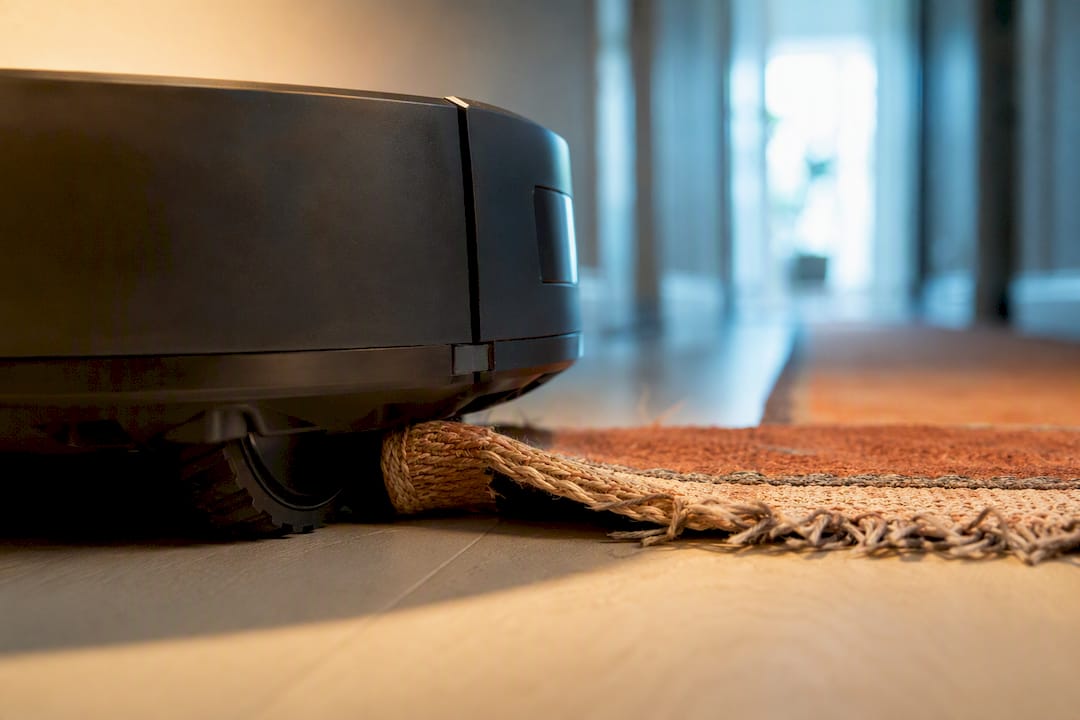
Stop the run, lift the robot, and check underneath for cords, toys, or rug fringe. Clear the obstruction, empty the dustbin, then set it back down and test its mobility on open floor. If it keeps getting stuck in the exact same spot with nothing visible in the way, reset the map or check for a firmware update.
TL;DR:
- The most common causes of repeated getting stuck include cords, toys, rug fringes, and low-clearance furniture that are easily cleared with pre-run room checks.
- Mechanical issues like hair wrapped around brushes, a stubborn bumper, or worn wheels typically indicate parts need replacement rather than cleaning.
- Software problems, such as outdated maps or firmware, are responsible when the robot repeatedly stalls in the same open area without visible obstacles.
- Regular maintenance like emptying the dustbin, wiping sensors, and re-mapping after room changes can significantly reduce stuck incidents.
- Contact support if mechanical wear or software fixes do not resolve recurring stuck problems within warranty or after trying all simple troubleshooting steps.
A stuck robot is almost never a serious problem, and you can usually clear it faster than it takes to make coffee. The fix follows a simple order: power down, lift, inspect, clear, empty, retest.
Pro Tip: Keep a small flashlight near the charging dock. Checking the underside of the robot in good light helps you spot thin threads that are easy to miss in a dim room, speeding up the process.
Before you dig into deep cleaning or app settings, figure out which category the stuck event falls into. That saves you from fixing the wrong thing.
Dirty sensors and a full dustbin are two of the most common triggers for a mid-clean stop, according to iFixit’s troubleshooting guide, and both are easy to rule out in under a minute. Check the bin level, wipe the cliff and bumper sensors, and note the battery percentage before assuming you have a bigger problem. If the same room keeps producing the same failure on different days, that’s your clue to look at mapping rather than the floor itself.
Most repeat stuck problems trace back to buildup the robot can’t clear on its own. A short cleaning routine handles nearly all of it.
Pro Tip: Empty the dustbin after every single run, not just when it looks full. A partially packed bin restricts airflow long before it looks visibly stuck.
A simple cadence keeps this from piling up: regular emptying of the bin, wiping sensors periodically, and doing deeper brush and wheel checks occasionally. If your model handles pet hair or stair-adjacent rooms, our pet hair maintenance guide and stair safety guide cover the extra steps those setups need.
Cleaning fixes what already went wrong. Room setup stops it from happening again.
Owners on community forums have solved persistent traps just by rearranging low furniture or briefly raising chair legs during cleaning days, no hardware repair needed. Corners and tight edges are a separate story. Robots typically leave a small gap along tight corners no matter how well you prep the room, and expect some manual touch-up there rather than treating it as a malfunction.
When the same location traps the robot run after run with nothing physically in the way, the problem usually lives in software, not the floor.
Pro Tip: Run a fresh map after any furniture move bigger than shifting a chair. Even small layout changes confuse older maps enough to cause repeat stalls.
If a firmware update and a fresh map don’t clear the problem after two or three runs, that’s the point to escalate to manufacturer support rather than keep troubleshooting blind. Our guide to how robot vacuum mapping works walks through the remap process in more detail.
A 60-second walk-through before you start the robot prevents most stuck incidents before they happen, and it costs you almost nothing in time.
Owners who skip this quick check are the ones who deal with the most repeat incidents. A 60-second pre-run walk-through has one of the best time-to-benefit ratios of anything on this list.
Some stuck events point to a part that’s simply worn out, not a mess you can clean away. Watch for these signs.
A wheel that keeps spinning after you’ve cleaned every hair and thread off it, but still won’t drive straight, likely has a damaged bearing or a cracked housing. A bumper that sticks in the pressed position, or doesn’t spring back after several presses, usually means the internal spring or contact switch has failed rather than just needing a wipe. A caster that wobbles side to side instead of spinning smoothly is another mechanical flag, especially if it started after a fall down stairs or a hard bump into furniture.
Battery symptoms deserve their own attention. A robot that used to finish a full house and now stops after a few rooms, or one that won’t hold a charge overnight, is likely dealing with battery degradation rather than a software glitch. This shows up gradually, so compare run times over a few weeks rather than judging from a single cycle.
If you’ve cleaned sensors, cleared wheels, checked the bumper, updated firmware, and reset the map, and the same mechanical symptom keeps returning, that’s your signal the issue is physical wear rather than dirt or software. Trying to force a worn part to keep working usually just strains the motor further. At that point, a repair or replacement part is the more sensible fix than another round of cleaning.
Reach out to the manufacturer once you’ve ruled out the simple fixes and the same problem keeps coming back within the warranty period, or when a part is visibly cracked, loose, or unresponsive.
Before you call or open a chat, gather three things: the model number (usually inside the dustbin compartment or on the base), the approximate purchase date, and a short description of what you’ve already tried. Support teams move faster when you can say “I’ve cleaned the sensors, cleared the wheels, and updated the firmware, but it still stalls in the hallway” instead of just “it’s stuck.”
Most manufacturers offer three support channels: an in-app help chat, a phone or email support line, and authorized service centers for hardware repairs still under warranty. The app-based chat is usually fastest for software and mapping issues. Phone or email support tends to handle warranty claims and parts replacement. If your robot is out of warranty and a hardware part has failed, ask specifically about paid repair options or replacement parts before assuming a full replacement is your only choice. Keep your receipt and model number on hand. Support reps almost always ask for both in the first exchange, and having them ready cuts the whole process down by several minutes.
Most stuck-robot complaints trace back to the same three things: something small on the floor, hair on a wheel, or a map that doesn’t match the room anymore. Watching customer questions and internal product feedback over time, the pattern holds. People jump to “my vacuum is broken” faster than they check for a phone cord under the couch., and. For deeper troubleshooting, our home gadget maintenance guide covers habits that apply well beyond robot vacuums.
— Tony
If you’re tired of chasing cords and remapping rooms, a robot built with fewer trouble spots from the start makes the whole routine easier. The FloorPilot™ Smart Robot Vacuum pairs a low profile with LiDAR mapping and a self-emptying station, so you’re not manually clearing the dustbin every run or squeezing under couches to check for clearance issues.

Low-profile designs can help clear more furniture without height mismatches that cause entrapment, and mapping support allows resetting or adjusting the path without guesswork. It’s not a promise that every stuck moment disappears. Cords and stray toys still trip up any robot vacuum. But it removes several of the most common causes before they start. Browse the full smart cleaning collection to compare options, or head to the product page to check current availability and start an order today.